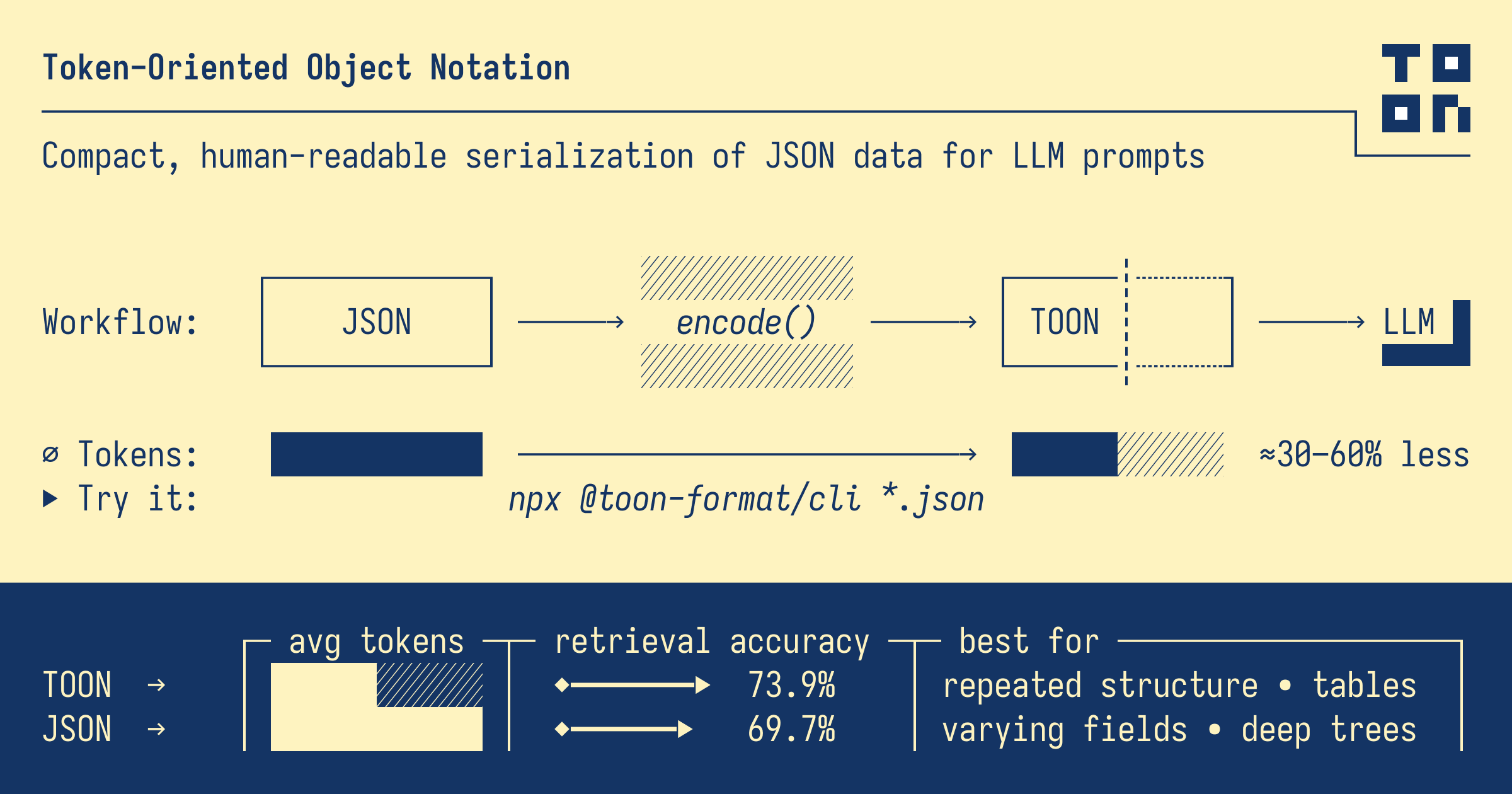
As Large Language Models (LLMs) become increasingly integral to modern applications, the cost of API calls has become a significant concern for developers. Token usage directly impacts both cost and latency. Enter TOON (Token-Oriented Object Notation) – a revolutionary data format designed specifically to minimize token consumption while maintaining data integrity.
📋 Table of Contents
- Key Takeaways
- What is TOON Format?
- TOON vs JSON: Token Comparison
- TOON Syntax Deep Dive
- Practical Applications
- Implementation Guide
- FAQ
- Conclusion
Key Takeaways
- Token Savings: TOON typically reduces token usage by 30-50% compared to JSON, directly lowering LLM API costs
- LLM Compatibility: TOON is designed to be easily parsed by LLMs like GPT-4, Claude, and other models without special instructions
- Lossless Conversion: TOON preserves all data types and structures from JSON, ensuring no information loss
- Simple Syntax: Uses a YAML-like indentation-based structure that's both human-readable and token-efficient
- Production Ready: Available as npm package
@toon-format/toonfor immediate integration
Want to convert your JSON data to TOON format and see the token savings? Try our free online converter!
👉 Try our JSON to TOON Converter
What is TOON Format?
TOON (Token-Oriented Object Notation) is a data serialization format specifically designed for efficient communication with Large Language Models. Unlike JSON, which was designed for JavaScript interoperability, TOON prioritizes:
- Minimal Token Usage: Every syntax element is optimized for tokenizer efficiency
- LLM Readability: Structured to be easily understood by AI models
- Human Readability: Clean, indentation-based syntax similar to YAML
- Type Preservation: Maintains all JSON data types (strings, numbers, booleans, null, arrays, objects)
Why Token Optimization Matters
| Model | Cost per 1M Input Tokens | Monthly Savings (50% reduction) |
|---|---|---|
| GPT-4 Turbo | $10.00 | $5.00 per 1M tokens |
| GPT-4o | $5.00 | $2.50 per 1M tokens |
| Claude 3 Opus | $15.00 | $7.50 per 1M tokens |
| Claude 3.5 Sonnet | $3.00 | $1.50 per 1M tokens |
For applications processing millions of tokens monthly, TOON can result in thousands of dollars in savings.
TOON vs JSON: Token Comparison
Example 1: User Data
JSON Format (156 characters, ~39 tokens):
{
  "users": [
    {"id": 1, "name": "Alice", "role": "admin", "active": true},
    {"id": 2, "name": "Bob", "role": "user", "active": true},
    {"id": 3, "name": "Charlie", "role": "user", "active": false}
  ]
}
TOON Format (98 characters, ~25 tokens):
users[3]{id,name,role,active}:
  1,Alice,admin,true
  2,Bob,user,true
  3,Charlie,user,false
Savings: ~36% fewer tokens
Example 2: API Response
JSON Format (289 characters, ~72 tokens):
{
  "status": "success",
  "data": {
    "products": [
      {"sku": "A001", "name": "Widget", "price": 29.99, "stock": 150},
      {"sku": "A002", "name": "Gadget", "price": 49.99, "stock": 75},
      {"sku": "A003", "name": "Gizmo", "price": 19.99, "stock": 200}
    ]
  },
  "timestamp": "2026-01-10T10:30:00Z"
}
TOON Format (168 characters, ~42 tokens):
status: success
data:
  products[3]{sku,name,price,stock}:
    A001,Widget,29.99,150
    A002,Gadget,49.99,75
    A003,Gizmo,19.99,200
timestamp: 2026-01-10T10:30:00Z
Savings: ~42% fewer tokens
TOON Syntax Deep Dive
Basic Types
# Strings (no quotes needed for simple strings)
name: Alice
message: Hello World

# Numbers
age: 25
price: 99.99
negative: -42

# Booleans
active: true
deleted: false

# Null
data: null
Objects
# Simple object
user:
  name: Alice
  age: 25
  email: alice@example.com

# Nested objects
config:
  database:
    host: localhost
    port: 5432
  cache:
    enabled: true
    ttl: 3600
Arrays
# Simple array
colors[3]:
  red
  green
  blue

# Array of objects (compact table format)
users[3]{id,name,role}:
  1,Alice,admin
  2,Bob,user
  3,Charlie,guest

# Mixed array
items[4]:
  string value
  42
  true
  null
The Table Format (Key Innovation)
TOON's most powerful feature is the table format for arrays of objects with consistent keys:
# Syntax: arrayName[count]{key1,key2,key3}:
products[5]{id,name,price,category,inStock}:
  1,Laptop,999.99,Electronics,true
  2,Mouse,29.99,Electronics,true
  3,Desk,199.99,Furniture,false
  4,Chair,149.99,Furniture,true
  5,Monitor,299.99,Electronics,true
This eliminates the repetition of keys for each object, which is the primary source of token waste in JSON arrays.
Practical Applications
1. ChatGPT Function Calling
When using function calling with GPT-4, the response data can be formatted in TOON:
const systemPrompt = `
When returning structured data, use TOON format:
- Objects use indentation
- Arrays of objects use table format: name[count]{keys}: values
- This reduces token usage significantly
`;

// Example function response in TOON
const toonResponse = `
searchResults[3]{title,url,snippet}:
  Best Practices Guide,/docs/best-practices,Learn the recommended approaches
  API Reference,/docs/api,Complete API documentation
  Tutorial,/docs/tutorial,Step-by-step guide
`;
2. RAG (Retrieval-Augmented Generation)
When injecting context into prompts, TOON significantly reduces token overhead:
// Instead of JSON context
const jsonContext = JSON.stringify(documents); // ~2000 tokens

// Use TOON context
const toonContext = encode(documents); // ~1200 tokens (40% savings)
3. Structured Output Parsing
Request LLM outputs in TOON format for efficient parsing:
const prompt = `
Analyze the following text and return results in TOON format:

Text: "${userInput}"

Return format:
sentiment: positive/negative/neutral
confidence: 0-1
keywords[n]:
  keyword1
  keyword2
entities[n]{type,value,confidence}:
  type1,value1,conf1
`;
4. Batch Processing
For batch API calls, TOON dramatically reduces costs:
// Processing 1000 records
// JSON: ~50,000 tokens
// TOON: ~30,000 tokens
// Savings at GPT-4 rates: $0.20 per batch
Implementation Guide
Installation
npm install @toon-format/toon
Basic Usage
import { encode, decode } from '@toon-format/toon';

// Convert JSON to TOON
const jsonData = {
  users: [
    { id: 1, name: 'Alice', role: 'admin' },
    { id: 2, name: 'Bob', role: 'user' }
  ]
};

const toonString = encode(jsonData);
console.log(toonString);
// Output:
// users[2]{id,name,role}:
//   1,Alice,admin
//   2,Bob,user

// Convert TOON back to JSON
const parsedData = decode(toonString);
console.log(JSON.stringify(parsedData, null, 2));
Integration with OpenAI
import OpenAI from 'openai';
import { encode, decode } from '@toon-format/toon';

const openai = new OpenAI();

async function queryWithToon(data) {
  const toonData = encode(data);

  const response = await openai.chat.completions.create({
    model: 'gpt-4-turbo',
    messages: [
      {
        role: 'system',
        content: 'Process the following TOON-formatted data and respond in TOON format.'
      },
      {
        role: 'user',
        content: toonData
      }
    ]
  });

  return decode(response.choices[0].message.content);
}
Token Estimation
function estimateTokens(text) {
  // Rough estimation: ~4 characters per token
  return Math.ceil(text.length / 4);
}

function calculateSavings(jsonData) {
  const jsonString = JSON.stringify(jsonData);
  const toonString = encode(jsonData);

  const jsonTokens = estimateTokens(jsonString);
  const toonTokens = estimateTokens(toonString);
  const savings = Math.round((1 - toonTokens / jsonTokens) * 100);

  return {
    jsonTokens,
    toonTokens,
    savings: `${savings}%`
  };
}
Best Practices
1. Use Table Format for Homogeneous Arrays
# Good: Table format for consistent objects
orders[100]{id,customer,total,status}:
  1,Alice,99.99,shipped
  2,Bob,149.99,pending
  ...

# Avoid: Individual objects when keys are consistent
orders:
  - id: 1
    customer: Alice
    total: 99.99
    status: shipped
2. Keep Keys Short but Meaningful
# Good: Concise keys
users[3]{id,nm,rl,act}:
  1,Alice,admin,true

# Avoid: Verbose keys
users[3]{userId,userName,userRole,isActive}:
  1,Alice,admin,true
3. Batch Similar Operations
# Good: Batch multiple items
updates[5]{id,field,value}:
  1,status,active
  2,status,inactive
  3,name,NewName
  4,email,new@email.com
  5,role,admin
4. Validate Before Sending
import { encode, decode } from '@toon-format/toon';

function validateToon(toonString) {
  try {
    const parsed = decode(toonString);
    const reencoded = encode(parsed);
    return true;
  } catch (e) {
    console.error('Invalid TOON:', e.message);
    return false;
  }
}
FAQ
Is TOON compatible with all LLMs?
Yes, TOON is designed to be parsed by any LLM that can understand structured text. It works well with GPT-4, Claude, Gemini, and other major models. The format is human-readable, so LLMs can interpret it without special training.
Can TOON handle complex nested structures?
Absolutely. TOON supports arbitrary nesting of objects and arrays. However, the token savings are most significant for arrays of objects with consistent keys.
Is there data loss when converting JSON to TOON?
No, TOON is a lossless format. All JSON data types (strings, numbers, booleans, null, arrays, objects) are preserved during conversion.
How do I handle special characters in TOON?
Strings containing commas, colons, or newlines should be quoted. The encoder handles this automatically:
message: "Hello, World!"
path: "C:\\Users\\name"
What's the performance overhead of encoding/decoding?
The encoding/decoding is very fast (microseconds for typical payloads). The time saved from reduced API latency typically far exceeds the encoding overhead.
Conclusion
TOON format represents a significant advancement in efficient data communication with LLMs. By reducing token usage by 30-50%, it offers:
- Cost Savings: Direct reduction in API costs
- Faster Responses: Fewer tokens mean lower latency
- Higher Throughput: Process more data within rate limits
- Cleaner Prompts: More readable structured data
As LLM usage continues to grow, optimizing token efficiency becomes increasingly important. TOON provides a practical, production-ready solution that can be integrated into existing workflows with minimal effort.
Ready to start saving tokens? Convert your JSON data to TOON format with our free online tool: